> setup guide - full version
Matrix Trader: set up in NinjaTrader 8
For members with an active Matrix Trader subscription. Takes about 15 minutes. Matrix runs on 7 Sim accounts with fixed names (step 3); prop and live accounts are reached with your own copy-trading tool (step 7). On the free trial? Use the trial guide instead.
- Install
- Your licence key
- The 7 Matrix Sim accounts
- Start the strategies
- Settings
- Daily goal and loss limit
- Prop / live: copy trading
- Keep it running after 5 PM ET
- Dashboard: pause, lock, results
- Good to know
1. Install
- Download MatrixAutoTrader_v2.6.zip from the #downloads channel on our Discord (members only).
- In NinjaTrader 8: Control Center > Tools > Import > NinjaScript Add-On, pick the zip.
- Restart NinjaTrader.
Updating from an older version? Import the new zip the same way. Your strategies keep their settings; disable and re-enable them (or restart NinjaTrader) so they run the new version.
2. Your licence key
- Open matrixautotrading.com/license.php and log in with Discord (the account that has your Matrix subscription).
- Copy your key (
MTX-…). You paste it into every Matrix strategy you add. - One key runs on one computer at a time. Moving to another PC? Reset it on the same page.
3. The 7 Matrix Sim accounts (same names for everyone)
Matrix trades only on its own Sim account: one fixed name per strategy and market, the same for every member.
Our strategies are hard-coded to these Sim account names. That avoids instrument clashes and ghost orders, and every member has exactly the same setup. On any other account Matrix stays OFF and tells you which account to use.
| STRATEGY | MARKET (CHART) | SIM ACCOUNT (EXACT NAME) |
|---|---|---|
| Matrix Flow | MES | SimFlowMES |
| Matrix Flow | MNQ | SimFlowMNQ |
| Matrix Flow | MGC | SimFlowMGC |
| Matrix Pivot | MNQ | SimPivotMNQ |
| Matrix Pivot | MGC | SimPivotMGC |
| Matrix Hunter | MNQ | SimHunterMNQ |
| Matrix Hunter | MES | SimHunterMES |
Create them in one click: Control Center > New > Matrix Trader Dashboard > Create Matrix Sim Accounts. It adds the missing ones and never changes your other accounts. (By hand: Accounts tab, right-click, Add simulation account, type the exact name.)
Run as many of the 7 as you like - start with one or two.
4. Start the strategies
Option A: Strategies tab, no chart (recommended)
- Control Center > Strategies tab, right-click, New Strategy…
- Pick MatrixAutoTrader and set:
- Instrument: the current contract, e.g.
MNQ 12-26. - Data series: any, e.g. 1 Minute.
- Account: the matching Matrix Sim account from the table above (e.g. Matrix Flow on MES =
SimFlowMES). - The Matrix settings (next section).
- Instrument: the current contract, e.g.
- Click OK, then tick Enabled on the new row. Repeat for each row you want.
- To change settings later: untick Enabled, right-click the row, Edit Strategy…, change, OK, tick Enabled again.
Option B: on a chart
- Open a chart of the market and pick the matching Matrix Sim account in Chart Trader.
- Right-click the chart: Strategies > MatrixAutoTrader > Add, set the same settings, Enabled, OK.
- On a chart you also get the status line, trade markers and the Chart Trader panel (Receiver Armed, multiplier, trading hours).
5. Settings
| SETTING | SET IT TO | WHAT IT DOES |
|---|---|---|
| Your Matrix License Key | your MTX-… key | From license.php (step 2). |
| I Accept the Risk Disclaimer | ticked | Nothing trades until it is ticked. |
| Strategy | from the table in step 3 | Matrix Flow, Matrix Pivot or Matrix Hunter. |
| Trading Mode | AutoTrading | SignalsOnly draws the signals on the chart and places no orders. |
| Exit Management | FollowMatrix | Same stop, targets, break-even and trailing as the Matrix trade. |
| Size Mode / Contract Multiplier | Multiplier / 1 to start (max 5) | Signal size × multiplier. Raise it slowly once you know the strategy. The daily limits grow with it (step 6). |
| Max Contracts | your hard cap, e.g. 4 | No Matrix position on that row ever gets bigger. |
| Prop Safety: No Opposite Index Positions | ticked (default) | Extra safety: skips an MES / MNQ entry if the same account is already the opposite way in another index future. |
| Daily Profit Target / Daily Loss Limit | leave at 200 / 200 | Always on and automatic - see step 6. You may enter a lower base (50 - 200), never higher. |
| Daily Limits Count | AllMatrixAccounts (default) | All your Matrix Sim accounts together (see step 6). |
| Trading Hours | AllDay | SessionsOnly trades only the Asia / London / New York windows you tick. |
| Flat Before Daily Break (4:40 PM ET) | ticked (default) | Flat at 4:40 PM ET, trades again from 6 PM ET by itself. |
| Exit on session close (NinjaTrader's own) | unticked | Not needed - Matrix goes flat by itself at 4:40 PM ET. |
| Share My Daily Results | your choice | Opt-in: your day's result (trades, wins / losses, net P&L) is sent privately to Matrix. No account numbers or personal data. |
Leave everything else at its default.
6. Daily goal and loss limit
- Always on and tied to your size:
The multiplier goes from 1 to 5. You can make the limits tighter (a lower base in the settings), never looser.
MULTIPLIER (OR CONTRACTS) 1 2 3 4 5 Daily goal / loss limit $200 $300 $400 $500 $500 - They count all your Matrix accounts together (realized + open P&L): one goal and one loss limit for your whole day, not one per strategy.
- When the day reaches the goal or the loss limit, every Matrix row closes its open trade and stops for the day.
- It starts again by itself at the next trading day (6 PM ET). No need to touch anything.
- Accounts you use for your own trades (SignalsOnly mode) are not counted.
- The Matrix Trader Dashboard (step 9) shows the same combined total live.
7. Prop-firm and live accounts: copy trading
Matrix itself trades only your Matrix Sim accounts. To trade a prop-firm evaluation / funded account or a live account, copy from a Matrix Sim account with your own copy-trading tool (for example NinjaTrader's own or a third-party trade copier) - or trade the signals manually.
- No hedging: do not copy two Matrix Sim accounts that can trade opposite sides of the same or a related market (e.g. Flow MNQ and Hunter MNQ, or MES and MNQ) into the same prop account - most firms count that as hedging. Simplest: copy one Matrix Sim account into one prop account.
- Some firms also forbid opposite positions across your accounts at the same firm. At one firm, follow only one Matrix strategy per market.
- Set your copier's size and daily loss rules inside the firm's daily loss / trailing drawdown and contract limit.
- Micro contracts only (MES / MNQ / MGC). Size up slowly.
- Watch the Matrix Sim accounts for a while first, with the exact same settings.
8. Keep the strategies running after 5 PM ET
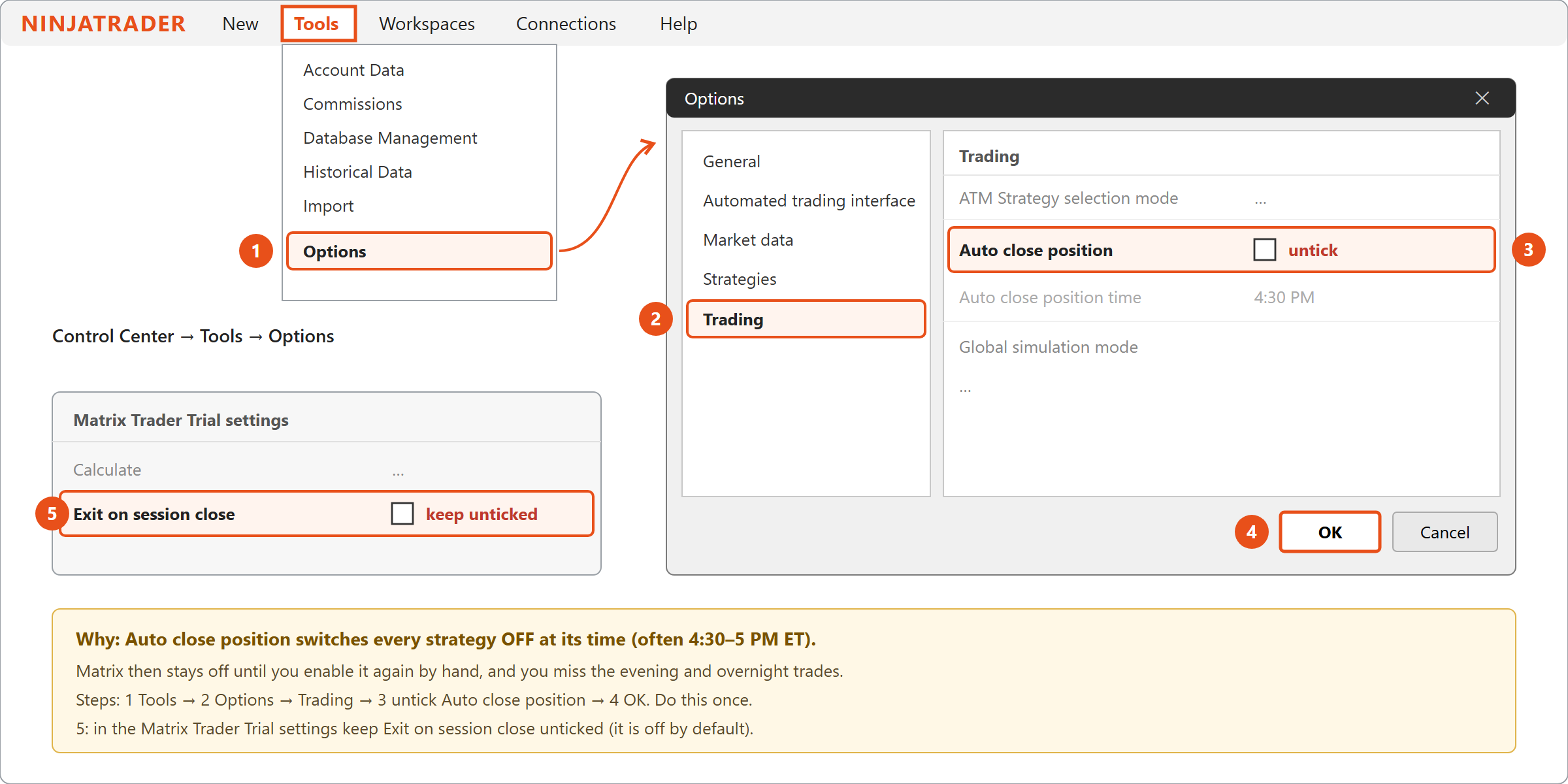
9. Dashboard: pause, lock, results
- Control Center > New > Matrix Trader Dashboard: today's P&L of your Matrix accounts against a goal you choose, one line per account, with Close buttons; below it My Results for this week (Monday to Friday, per day and per strategy - it starts fresh every Sunday).
Type
-AccountNamein its Accounts box to hide an account you use for your own manual trading. - Lock Trading For The Day (dashboard button): had enough for today? It locks every Matrix account in the dashboard out of new trades until 6 PM ET - it cannot be undone early, even by restarting. Open trades are not closed (use Close ALL first). Trading starts again by itself at 6 PM ET. The button and the panel turn purple while locked (and amber while Pause All is on).
- Pause All / Resume All (dashboard buttons): before CPI, FOMC or other big news, Pause All closes every open Matrix trade and takes no new ones; the strategies stay enabled. Press Resume All whenever you want - the pause stays on until you do (also overnight and after a restart).
- NinjaTrader's own report: New > Account Performance, pick an account and dates, Generate.
10. Good to know
- NinjaTrader must stay open and connected while you want Matrix to trade.
- After a restart, reconnect, workspace change or Windows update, check the Strategies tab: your Matrix rows must still be Enabled.
- At the contract roll (every 3 months), change each row's instrument to the new contract (e.g.
MNQ 03-27).
| STATUS (CHART) | MEANING |
|---|---|
| ACTIVE | Running and waiting for Matrix signals. |
| ACCEPT RISK DISCLAIMER IN SETTINGS | Tick I Accept the Risk Disclaimer. |
| NOT AUTHORIZED - CHECK LICENSE KEY | Paste the key from license.php again. |
| SUBSCRIPTION INACTIVE | Your Matrix subscription is not active - check Whop / Discord. |
| LICENSE IN USE ON ANOTHER PC | Reset the key on license.php if you moved computers. |
| OFF - USE THE SIM ACCOUNT SIMFLOWMES … | Matrix trades only on its fixed Sim account - pick the account it names (create it with the dashboard button). |
| OFF - ANOTHER MATRIX STRATEGY TRADES … | Two Matrix rows on the same market and account - give this one its own account. |
| PROFIT TARGET HIT / LOSS LIMIT HIT - PAUSED | Done for today on this account; starts again at 6 PM ET. |
| PAUSED - PRESS RESUME ALL | You pressed Pause All in the dashboard. Press Resume All to trade again. |
| DAILY BREAK - FLAT UNTIL 6 PM ET | 4:40–6 PM ET: no trades. Resumes by itself. |
| SIGNAL SOURCE OFFLINE | No Matrix signals for a while (e.g. market closed). Nothing to do. |
| NO CONNECTION | Your internet or the Matrix server is unreachable; it retries by itself. |
| UPDATE REQUIRED | Download and import the latest zip from #downloads. |
Messages such as "signal skipped - Matrix Trader does not trade ES" or "Prop Safety: this account is short MNQ" appear in New > NinjaScript Output.